An open-source tool for collecting privacy-friendly computer interaction data paired with self-reports, ready to fork and deploy to your own study participants.
Most researchers who want to study how people actually work, study, and spend their time at their computers face the same challenge early on: before you can collect a single data point, you need software that runs reliably on laptops and computers, logs interaction data without being a keylogger, prompts participants for self-reports, handles participant consent and privacy, and gets the data back to you without exposing sensitive information. Building that from scratch can take months of work before the research even starts.
PersonalAnalytics exists so you don’t have to. Developed and maintained by HASEL, it’s a free, open-source desktop application built specifically for researchers who want participants to run a study client on their own machines and collect computer interaction data in a privacy-protected way. It has been used with over a thousand participants across more than a dozen peer-field studies, field experiments and lab experiments at venues like CHI, CSCW, DIS, and TSE.
What PersonalAnalytics can collect
PersonalAnalytics is built around the idea that automatically collected data alone is rarely enough. It pairs objective interaction logging with in-the-moment self-reports, so you can correlate what people did with how they felt or judged their own work. The data collection is modular, organized into “trackers” you can enable, disable, and configure independently:
- Window and application activity. Regularly records which application is in the foreground, its window title, and (on macOS) the URL of the active browser tab. Each activity is automatically categorized into a type such as coding, email, or AI use. This gives you an objective picture of how participants spend time without any manual logging on their part.
- User input. Stores aggregated counts of keystrokes, mouse clicks, pixels moved, and pixels scrolled per interval. Importantly, it never stores the actual keys or text typed, so it captures interaction intensity without being a keylogger.
- Experience sampling. Prompts participants with a small pop-up at configurable intervals to self-report on one or more questions, for example on perceived productivity, stress, or mood. Supports Likert scales, single-choice, multi-choice, and free-text responses, with optional randomized timing.
- Daily surveys. Asks a set of questions once at the start and/or end of the workday, scheduled relative to each participant’s own configured work hours rather than a fixed clock time. Useful for morning intention-setting and evening reflection designs.
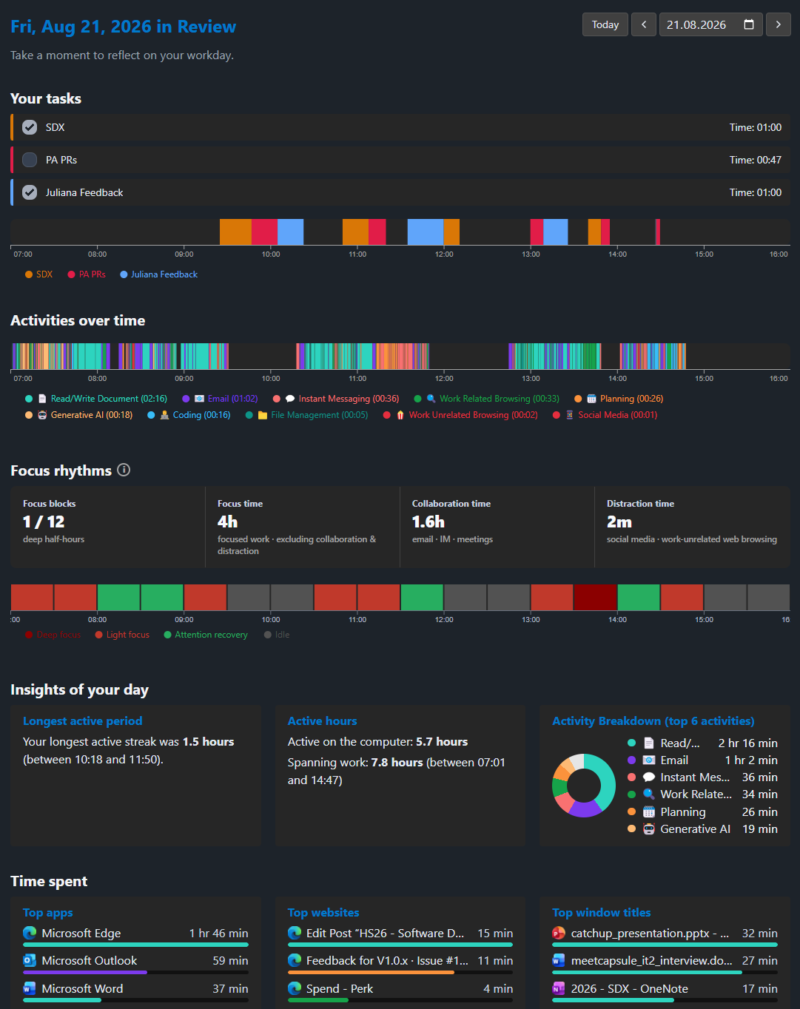
- Daily retrospection. An end-of-day timeline that shows participants how their day was fragmented and allocated across activities. This is participant-facing by design: it gives people a reason to keep the tool running, which helps retention over multi-week studies.
All of this data is stored only locally, in a SQLite database on the participant’s own computer. Nothing is uploaded automatically.

What you could use PersonalAnalytics for
Here are a few (rough) study ideas PersonalAnalytics is well suited for. Some mirror projects already running on the platform; others are open directions that might be worth pursuing:
- Computer use in (higher) education. Combine surveys, experience sampling, and device-usage data to understand how students actually work, study, and get distracted.
- Interaction with specific digital content. Study the real-world effects of social-media and news consumption in the field, pairing usage data with short in-the-moment surveys and follow-up interviews.
- Digital work regimes and digital hygiene. Investigate how remote and hybrid work reshape knowledge work, using usage data to surface early signs of overwork or fragmentation and to support self-management and reflection.
- How people work with AI assistants. Track when and how participants reach for chatbots and AI coding tools throughout the day, and pair that with self-reports on trust, perceived usefulness, and cognitive effort, to study how AI is actually integrated into everyday work rather than how people say they use it.
- AI use and skill or focus effects. Combine interaction logs with experience sampling to examine questions like whether heavy AI-assistant use correlates with more fragmented attention, changed help-seeking behavior, or shifts in how long people stay on a task.
- Focus, interruptions, and well-being. Correlate objective fragmentation (app switches, activity types) with self-reported stress, mood, or perceived productivity to study interruption patterns and their toll over multi-week periods.
Configure PersonalAnalytics for your study
Setup and customization for your own research project is easy and documented.
The intended workflow is: fork the repository, edit the configuration file, and deploy your fork. Most study-level configurations, such as study name, privacy policy, which trackers run, and the experience sampling question, can be set in a single file; anything it doesn’t cover can be changed in code.
Deployment runs through the included GitHub Actions pipeline, which produces code-signed Windows and notarized macOS installers and can push auto-updates to participants mid-study.
We’re happy to help in case of questions on tailoring PersonalAnalytics to your needs.
Aggregating Participant Data
As everything is stored locally, there’s a deliberate export step at the end of the study. PersonalAnalytics includes a guided wizard that walks each participant through reviewing their own data and optionally obfuscating sensitive parts (e.g. redacting window titles) before anything leaves their machine. Participants choose per data type how to share: as-is, obfuscated, partially obfuscated by a list of terms, or not at all.
This keeps participants in full control of their data, which is both ethically sound and useful for ethics-board approval, and it tends to improve participation, since people share more willingly when they can see and sanitize what they’re sharing. Export formats include zipped SQLite, zipped JSON, and a direct upload to UZH’s Data Donation Lab.
Getting started
- Try AIRbar, one well-maintained fork
- Read the docs. RESEARCH.md is the researcher’s manual.
- Fork the repository: github.com/HASEL-UZH/PersonalAnalytics
- Configure your study in
study.config.ts, then deploy via the provided GitHub Actions workflow. - Get in touch for questions or institutional support: Dr. André Meyer (ameyer@ifi.uzh.ch).
Contributions (bug fixes, improved or new trackers) are welcome too; the workflow is documented in RESEARCH.md.
Other seful links: the repository, the researcher documentation, and the PersonalAnalytics website. PersonalAnalytics is part of D2USP, the Digital Device Use Self-Monitoring Platform, a UZH research infrastructure co-funded by the Digital Society Initiative (DSI).


Comments are closed.